Impact Analysis
The core feature of Parrant - understand the downstream effects of changing a column before you make the change.
Overview
Impact Analysis is the primary reason to use Parrant. It helps you answer the critical question: "What happens if I change this column?"
Column-level lineage is the tool that enables this analysis. By tracking how data flows through your transformations at the column level, we can show you exactly what will be affected when you modify a column.
When you select a column in the Interactive Explorer, you can analyze its impact across your entire dbt project. This feature shows you:
- Which models and columns depend on this column
- Which transformations (SUM, CASE, etc.) use this column and may need review
- Which dashboards and exposures will be impacted
How to Use
-
Start the Interactive Explorer:
-
Select a model and column from the sidebar
-
Load the lineage graph
-
Click "Analyze Impact" in the card that appears on the graph
-
Review the impact analysis panel that opens on the right
Understanding the Results
The impact analysis categorizes columns into:
- Requires Review: Columns with transformations (derived columns) that may break if the source column changes
- Pass-through Columns: Direct references that will automatically propagate changes
- Affected Models: All models in the dependency chain
- Affected Exposures: Dashboards and reports that may be impacted
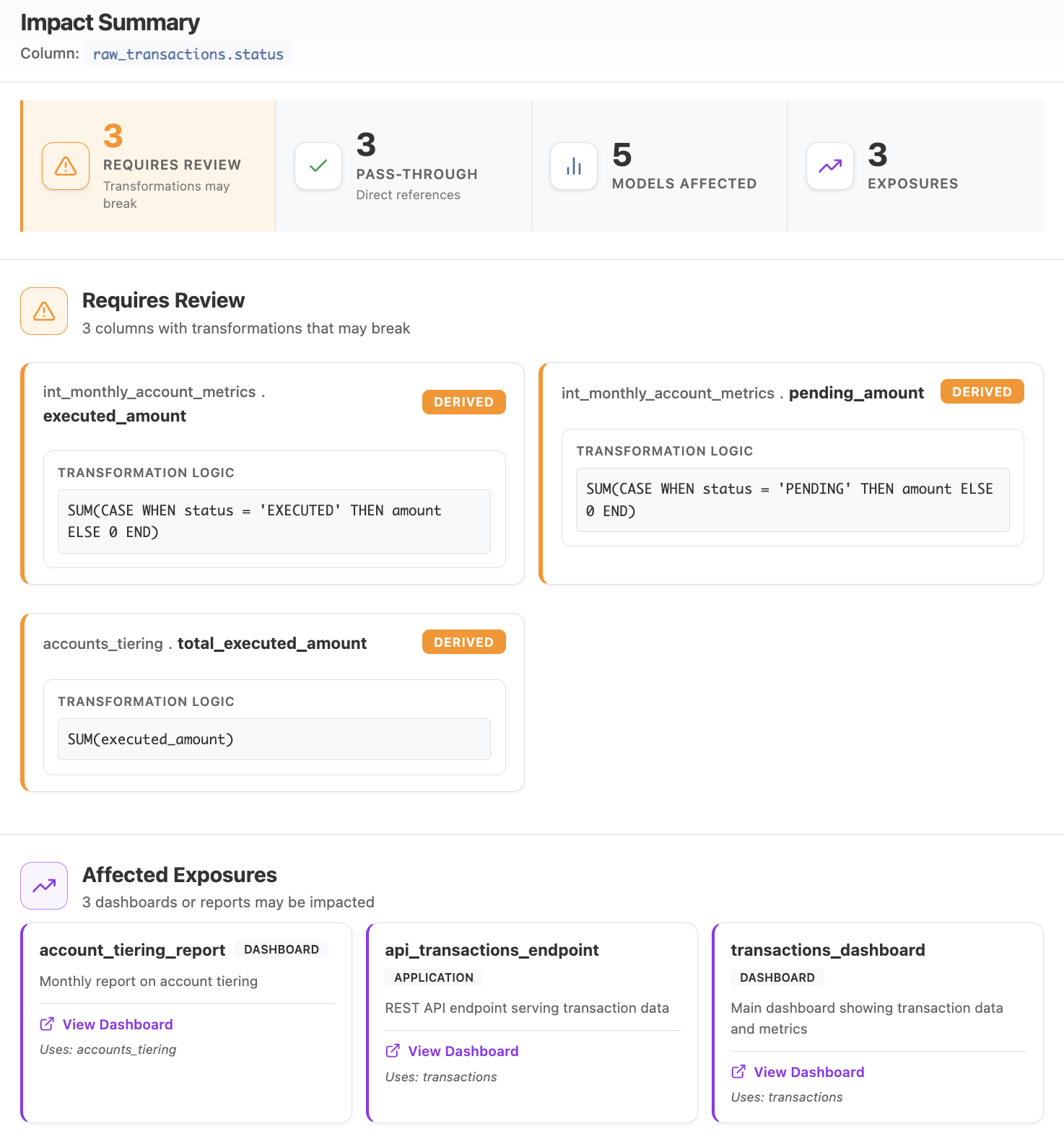 Impact Analysis panel showing column dependencies and transformations
In CI (GitHub Action)
Run the same impact analysis on every pull request. The action diffs the base- and head-branch dbt artifacts and posts a sticky column-level blast-radius comment on the PR. See the copy-paste workflow to wire it up.
Outputs
The action exposes the impact result so later workflow steps can react to it:
| Output | Description |
|---|---|
affected_models |
Number of downstream models whose output is affected by the change. |
affected_columns |
Number of downstream columns affected. |
affected_exposures |
Number of business-facing exposures (dashboards/apps) affected. |
provable_breaks |
Number of dbt tests the change orphans (will fail on the next dbt build). |
verdict |
Overall ruling — safe, review, or block. |
tripped_level |
Highest severity band reached — none, any, critical, exposures, or tests. |
overrides_applied |
Number of honored -- lineage:allow-* override pragmas that lowered the ruling on this run (0 when none). |
has_rebuild |
Whether any model must be rebuilt (true/false). Only emitted when the emit-selector input is true — see Selective builds below. |
rebuild_selector |
Space-joined dbt node-name selector for a selective dbt build --select; empty when has_rebuild is false. Only emitted when emit-selector is true. |
Give the action an id and read steps.<id>.outputs.* in a later step:
      - name: Column-level impact assessment
        id: impact
        uses: Fszta/parrant@v0
        with:
          manifest: artifacts/head/manifest.json
          catalog: artifacts/head/catalog.json
          base-manifest: artifacts/base/manifest.json
          base-catalog: artifacts/base/catalog.json
          fail-on: none

      - name: Warn on exposure impact
        if: steps.impact.outputs.tripped_level == 'exposures'
        run: echo "::warning::This PR affects ${{ steps.impact.outputs.affected_exposures }} exposure(s)"
The outputs are populated even when fail-on trips the gate, so a downstream step still
runs on failure with if: always().
Selective builds
Set the emit-selector input to true to have the action publish the minimal rebuild set for
the change — the models CI must rebuild, and nothing more. This is derived purely from the diff
(no policy required) and exposed as two outputs, has_rebuild and rebuild_selector, so a later
step can run a selective dbt build instead of a full one.
      - name: Column-level impact assessment
        id: impact
        uses: Fszta/parrant@v0
        with:
          manifest: artifacts/head/manifest.json
          catalog: artifacts/head/catalog.json
          base-manifest: artifacts/base/manifest.json
          base-catalog: artifacts/base/catalog.json
          emit-selector: "true"
          fail-on: none

      - name: Selective rebuild
        if: steps.impact.outputs.has_rebuild == 'true'
        run: dbt build --select ${{ steps.impact.outputs.rebuild_selector }}
The rebuild set is fail-closed: it includes the edited models, every model reached by a change
that is not provably additive, and every model parrant could not analyze. When confidence is
partial it widens to every reachable model rather than risk skipping one. See
selection in the JSON reference
for the exact rule and the honesty invariants.
Branch on has_rebuild, not on the selector string
When nothing needs rebuilding, has_rebuild is false and rebuild_selector is empty. Always
guard the build step with if: steps.impact.outputs.has_rebuild == 'true' — running
dbt build --select "" selects nothing and exits green, silently skipping a build that may
have been needed.
Validate the selector, fail closed on unknowns
The selector uses dbt node names. Validate them against dbt ls and treat any name you cannot
resolve (renamed, removed, new, or a Python model) as a model to rebuild. emit-selector is
additive: it never posts a comment and never changes the exit code — gating stays with
fail-on.
Use Cases
Before modifying a column: - Understand which transformations depend on it - Identify which dashboards need updates - Plan your change strategy
During refactoring: - Track the blast radius of schema changes - Prioritize which models to update first - Ensure no downstream dependencies are missed