Impact Analysis
The core feature of DBT Column Lineage - understand the downstream effects of changing a column before you make the change.
Overview
Impact Analysis is the primary reason to use DBT Column Lineage. It helps you answer the critical question: "What happens if I change this column?"
Column-level lineage is the tool that enables this analysis. By tracking how data flows through your transformations at the column level, we can show you exactly what will be affected when you modify a column.
When you select a column in the Interactive Explorer, you can analyze its impact across your entire dbt project. This feature shows you:
- Which models and columns depend on this column
- Which transformations (SUM, CASE, etc.) use this column and may need review
- Which dashboards and exposures will be impacted
How to Use
-
Start the Interactive Explorer:
-
Select a model and column from the sidebar
-
Load the lineage graph
-
Click "Analyze Impact" in the card that appears on the graph
-
Review the impact analysis panel that opens on the right
Understanding the Results
The impact analysis categorizes columns into:
- Requires Review: Columns with transformations (derived columns) that may break if the source column changes
- Pass-through Columns: Direct references that will automatically propagate changes
- Affected Models: All models in the dependency chain
- Affected Exposures: Dashboards and reports that may be impacted
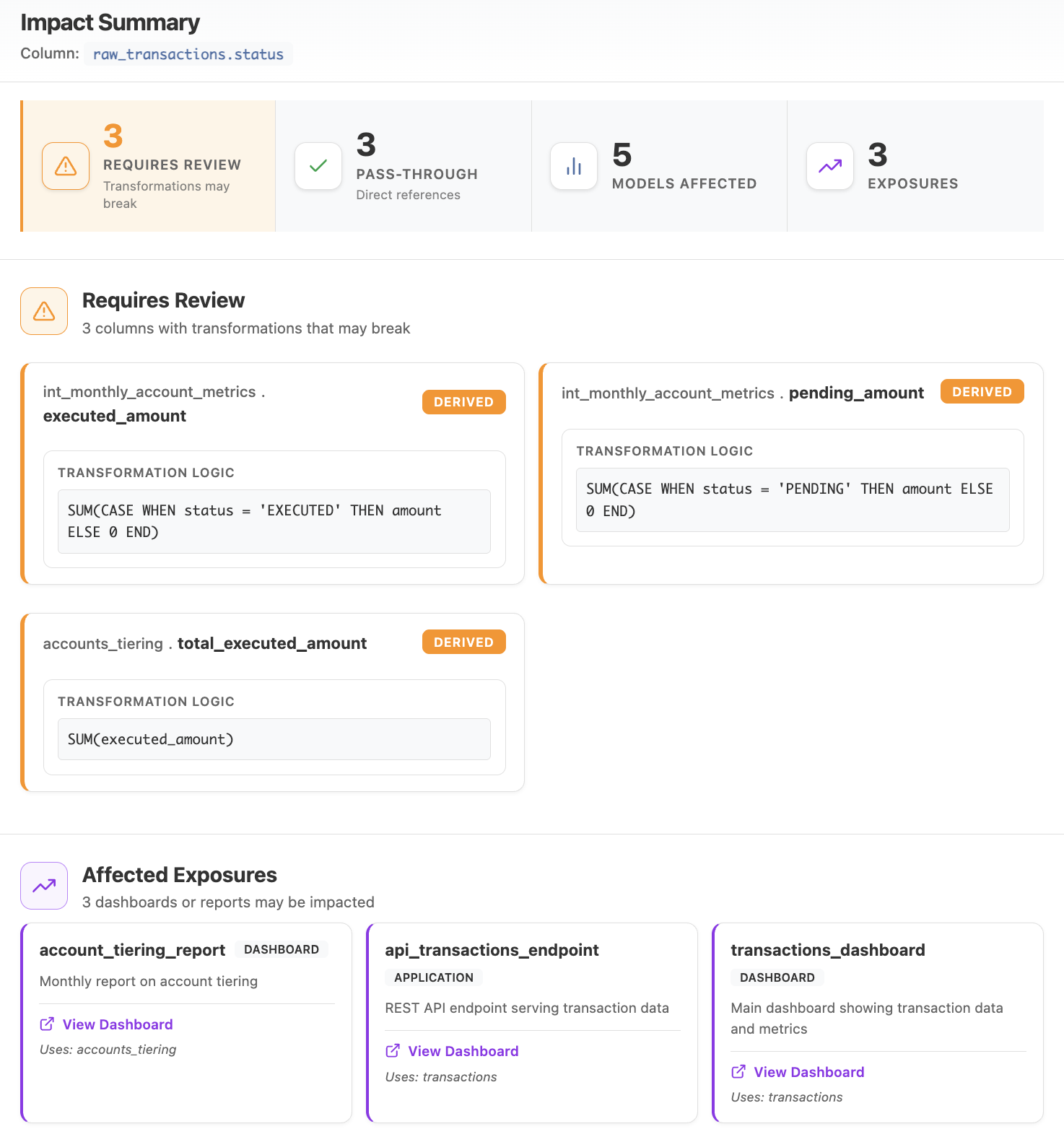 Impact Analysis panel showing column dependencies and transformations
In CI (GitHub Action)
Run the same impact analysis on every pull request. The action diffs the base- and head-branch dbt artifacts and posts a sticky column-level blast-radius comment on the PR. See the copy-paste workflow to wire it up.
Outputs
The action exposes the impact result so later workflow steps can react to it:
| Output | Description |
|---|---|
affected_models |
Number of downstream models whose output is affected by the change. |
affected_columns |
Number of downstream columns affected. |
affected_exposures |
Number of business-facing exposures (dashboards/apps) affected. |
provable_breaks |
Number of dbt tests the change orphans (will fail on the next dbt build). |
verdict |
Overall ruling — safe, review, or block. |
tripped_level |
Highest severity band reached — none, any, critical, exposures, or tests. |
Give the action an id and read steps.<id>.outputs.* in a later step:
      - name: Column-level impact assessment
        id: impact
        uses: Fszta/dbt-column-lineage@v0
        with:
          manifest: artifacts/head/manifest.json
          catalog: artifacts/head/catalog.json
          base-manifest: artifacts/base/manifest.json
          base-catalog: artifacts/base/catalog.json
          fail-on: none

      - name: Warn on exposure impact
        if: steps.impact.outputs.tripped_level == 'exposures'
        run: echo "::warning::This PR affects ${{ steps.impact.outputs.affected_exposures }} exposure(s)"
The outputs are populated even when fail-on trips the gate, so a downstream step still
runs on failure with if: always().
Use Cases
Before modifying a column: - Understand which transformations depend on it - Identify which dashboards need updates - Plan your change strategy
During refactoring: - Track the blast radius of schema changes - Prioritize which models to update first - Ensure no downstream dependencies are missed